GLUECOMP
15 MB
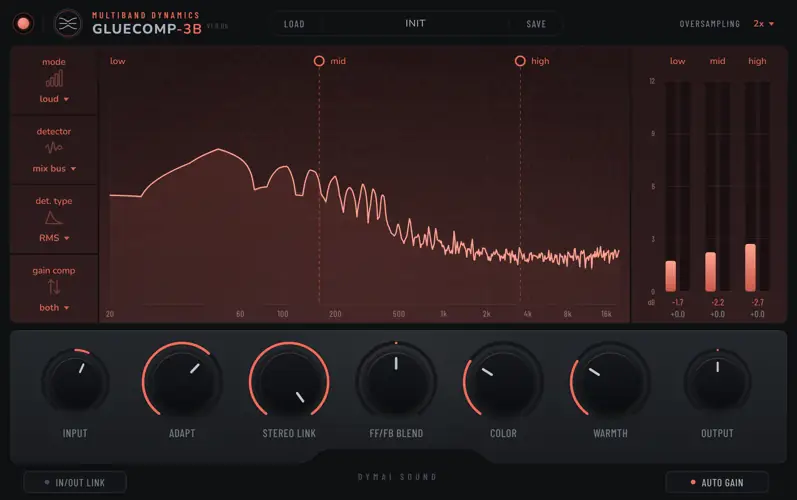
Each band listens for itself. Low, mid and high have their own detectors and timing. ADAPT controls how much the compressor reacts when one band starts to stand out. Use it on a single track, a drum bus or the whole mix. Turn on auto gain and compare with PROCESS to hear the change without a big jump in loudness.
Find the right feel.
Four modes set the timing and strength of the compression. Start with the one that suits the track.
Transparent
Gentle control for a mix that needs a little help staying together.
Punchy
A quicker response for drums and parts that need to keep their attack.
Loud
Stronger compression for a denser sound before your final limiter.
Aggressive
Heavy compression with a wide knee when you want to hold things down.
A good place to start.
Choose a mode.
Try Transparent for gentle control, or Punchy for drums.
Set the response.
Choose Instrument or Mix Bus, then adjust ADAPT by ear.
Check the change.
Leave auto gain on and switch PROCESS off and on to compare.
Control the dynamics.
Shape the tone.
Keep it subtle, add some weight, or push a little harder. The main controls stay within reach.
Tame the peaks.
Bring up the quiet detail.
Each band combines downward and upward compression. The meters show how much level is taken away and how much is added.
A little body.
A softer edge.
COLOR adds console-inspired body and harmonics. WARMTH gives you a darker, softer balance, with less bass boost on material that already has plenty of low end.
Compare at a similar loudness.
Auto gain follows the change in loudness. PROCESS switches between processed and dry audio with matched latency. For a manual comparison, turn auto gain off and use OUTPUT to trim the processed signal.
Start with a preset. Make it yours.
Twelve factory presets cover mix bus, drums, bass, vocals, keys and more. Save your own settings as a .gc3bpreset file and bring them into another session.
Mix Bus · Gentle Glue
Drums · Punch and Body
Vocal · Smooth Level


GLUECOMP-3B.1.0.0b ( 17 MB )