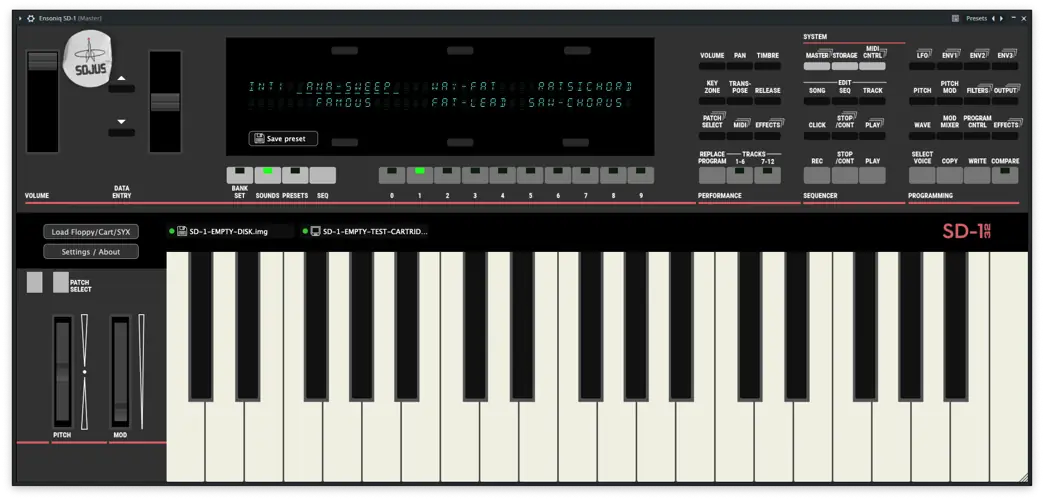
Ensoniq SD-1
85.2 MB
MAME®-based VST3 emulation of the Ensoniq® SD-1 32-Voice synthesizer built with JUCE®
We are Sojus Records, one of the longest-running netlabels still active. We are musicians, not programmers, but we love old synths and emulations. We decided to build a fully featured VST3 version of the MAME-emulated Ensoniq SD-1/32, which has never been emulated before. Thanks to the recent AI coding revolution, we have successfully built it. This proof-of-concept is an important step for both musicians and coders. We are looking forward to bringing other MAME synths to life in the future!
Features:
– Windows 10+ 64 bit VST3 AVX1/AVX2, Mac Intel+ARM Universal Binary VST3, Linux VST3 Generic/AVX2
– VFX, VFX-SD, SD1 .SYX SYS-EX file import. Read the FAQ for more info!
– FULL VST automation (All keys, sliders and buttons. Now you can save presets: Saving requires holding down PRESETS button and pressing a BANK button), full MIDI CC controlling, polyphonic aftertouch
– Global settings saving
– VST3 state saving
– 4 different panel layouts with resizable GUI and VFD display
– Buffer setting
– 4 outputs: stereo main out, optional stereo aux (dry signal with no effects)
– Can load all compatible VFX/VFX-SD/SD1-24/SD1-32 disk images (.img, .hfe, .dsk, .eda) and cartridges (.eeprom, .rom, .cart, .sc32)
– – – How to load: Attach the disk image using the “Load Floppy/Cartridge” button. Press Storage, then select DISK. Press LOAD. The display will show the Disk Load page with the File Type selected. Move the data entry slider to select your file.
Known limitations
– Only 1 instance can run at a time per DAW due to engine limitations.
– Daw automation is not visible on GUI
– No floppy drive sound 😀
– Mac binaries require one of the following methods to run due to Apple’s security policies:
– – – Manual authorization: The user must go to System Settings > Privacy & Security and, after the DAW has attempted to load the plugin, click the “Open Anyway” button.
– – – or
– – – Removing quarantine (via Terminal): Run the following command on the plugin bundle:
sudo xattr -rd com.apple.quarantine /Library/Audio/Plug-Ins/VST3/EnsoniqSD1.vst3
– – – Get Sentinel if you stuck with authorization: https://github.com/alienator88/Sentinel


EnsoniqSD1.0.9.8 ( 96 MB )

