TugAutomat
72 MB
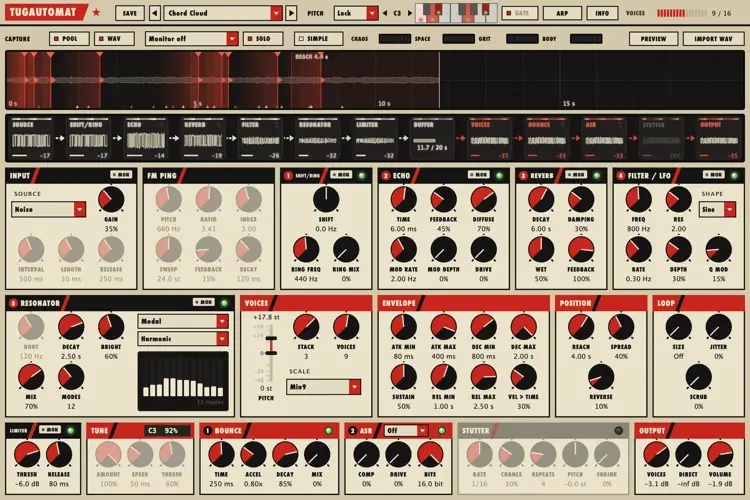
A machine that keeps sampling itself. A chain of odd sound sources and feedback effects runs on its own and records itself into a 20-second loop; your MIDI notes send voices into that recording to read it back at other speeds, pitches and positions.
Why it exists
I started TugAutomat for myself. I wanted a box that keeps making strange material on its own, so I could play with what it just did instead of designing every sound from scratch.
I like music that sounds a little broken and alive at the same time: glitches that repeat in uneven patterns, metal that rings in tunes it shouldn’t, rhythms that never quite come round the same way twice. Most instruments are built to be predictable. This one is built to surprise you, and then let you steer.
It grew slowly, one experiment at a time, and I’m sharing it because a few friends wanted to try it. It is not a do-everything synth and it isn’t trying to be.
How it works
TugAutomat has two halves: one makes material, the other plays it back.
The generation chain runs all the time. A source (noise, clicks, a WAV file, FM pings, mathematical figures, strange attractors) passes through five feedback blocks you can reorder by dragging, then a limiter. You don’t hear this part directly: it is the raw material.
The buffer records the chain into a 20-second circular loop, and tags it with the pitch it was tuned to.
The voices are what you hear. Every MIDI note starts one (up to 16). A voice jumps into the recording, reads it at its own speed and direction, with its own envelope: hard notes read the fresh material just recorded, soft notes reach further back.
The output bus colours the voices: a bouncing-ball delay, an ASR-10 style lo-fi stage (29.76 kHz, fewer bits) and a tempo-synced stutter.
Direct lets you hear the chain itself, and in Play mode your keys play the chain like an instrument while the voices answer from what it recorded.
The same thing, layer by layer
These are the pages of the INFO window inside the plugin, captured while it plays: blocks glow with the sound passing them, and the generation and playback pages show the blocks in the order you set.
Generation: the source and the five reorderable blocks that feed the recording.
What’s inside
Sources
Noise, clicks, your own WAV file, FM pings with inharmonic ratios
Mathematical figures played as sound: Harmonograph, Clifford map, Superformula, Spirograph, Moiré
Flow: 15 continuous strange attractors (Lorenz, Rössler, Aizawa, Thomas and more), solved at audio rate
The chain
Frequency shifter and ring modulator, a short feedback echo, an 8-line reverb, a bandpass with an attractor-driven LFO
Resonators: comb, modal bodies (bell, marimba bar, metal tine, drum membrane with measured partials), a plucked string and a closed pipe, tuned to within about a cent
Playing it
Four pitch modes: Free, Key (snaps to a scale and pulls pitched material into tune), Lock (the whole chain tuned to a root), Play (your keys play the chain)
17 scales and chords, a custom scale from a one-octave keyboard, chord stacking per note
An arpeggiator with ratchets, probability and polymetric lanes: velocity, ratchet and chance can cycle over different lengths so the pattern drifts
Stutter: tempo-synced repeats of the slice just played, falling in pitch and speeding up
Four macros (Chaos, Space, Grit, Body) and a Simple view when you just want to play
Seeing it
The signal strip shows every block’s scope and level, with the sound flowing along the arrows
Voices appear as wedges riding the recording, with their start points, loop windows and the Reach window marked
MON listens to any point of the chain; SOLO greys out everything you are not hearing
INFO opens seven pages of live diagrams that explain each layer, drawn with the sound passing through them
Three panel themes: a constructivist poster look (default), dark and light hardware
22 factory presets, your own presets in folders, a resizable window
Who it’s for (and who it isn’t)
You’ll probably enjoy it if you:
like glitch, IDM, experimental electronics, sound design and textures that move by themselves
enjoy steering a process more than programming a patch note by note
want a source of strange, pitched or rhythmic material to record, resample and cut up
It is probably not for you if you need:
a clean, predictable synth for basslines and pads that sound the same every time
a preset browser full of finished, mix-ready sounds
something you can learn in five minutes and never open the manual for
That’s fine. It’s made for a small corner of people, me included.
Your first ten minutes
Load Chord Cloud or Struck Bells and hold a few notes. The voices need MIDI; nothing plays until you do (or turn on the arp with Latch).
Turn up Direct in the OUTPUT panel to hear what the chain is recording right now; turn it down again to hear only the voices.
Press SIMPLE and move the four macros. At zero they change nothing, so you can always get back.
Load Glitch Rolls, hold one note with Latch on and change the arp’s lane lengths: the pattern starts to drift.
Click MON on any block to hear the chain at that point.
Press INFO whenever you’re lost: the diagrams show what each layer does, live, and a click on a block shows you where it is.
A full manual (English and Turkish) comes with the download.
Formats and requirements
macOS AU, VST3
Universal (Apple Silicon and Intel), macOS 10.13 or later; signed and notarized installer
Windows VST3 64-bit
Linux VST3 64-bit
Instrument plugin with MIDI input, stereo output; version 1.0.1
CPU: the sound engine uses a few percent of one core on an Apple M1; the animated window costs more than the sound, and can be calmed with Motion off
Presets are plain XML files in a folder of your choice, so you can share them
Honest notes
It is generative: the same preset and the same notes will not play back identically twice. Record what you like.
The voices need MIDI. On its own the chain records silently unless you turn up Direct.
It rewards patience more than presets. Expect to spend an evening finding your way around.
It’s a one-person project. I fix what I can find; if something misbehaves in your host, tell me and I’ll look at it.


TugAutomat.1.0.1 ( 72 MB )